Introduction WeatherXM H2 Open Edition (WS2001)
Autonomous 8-in-1 LoRaWAN weather sensor for private LoRaWAN networks, The Things Network (TTN), and ChirpStack.
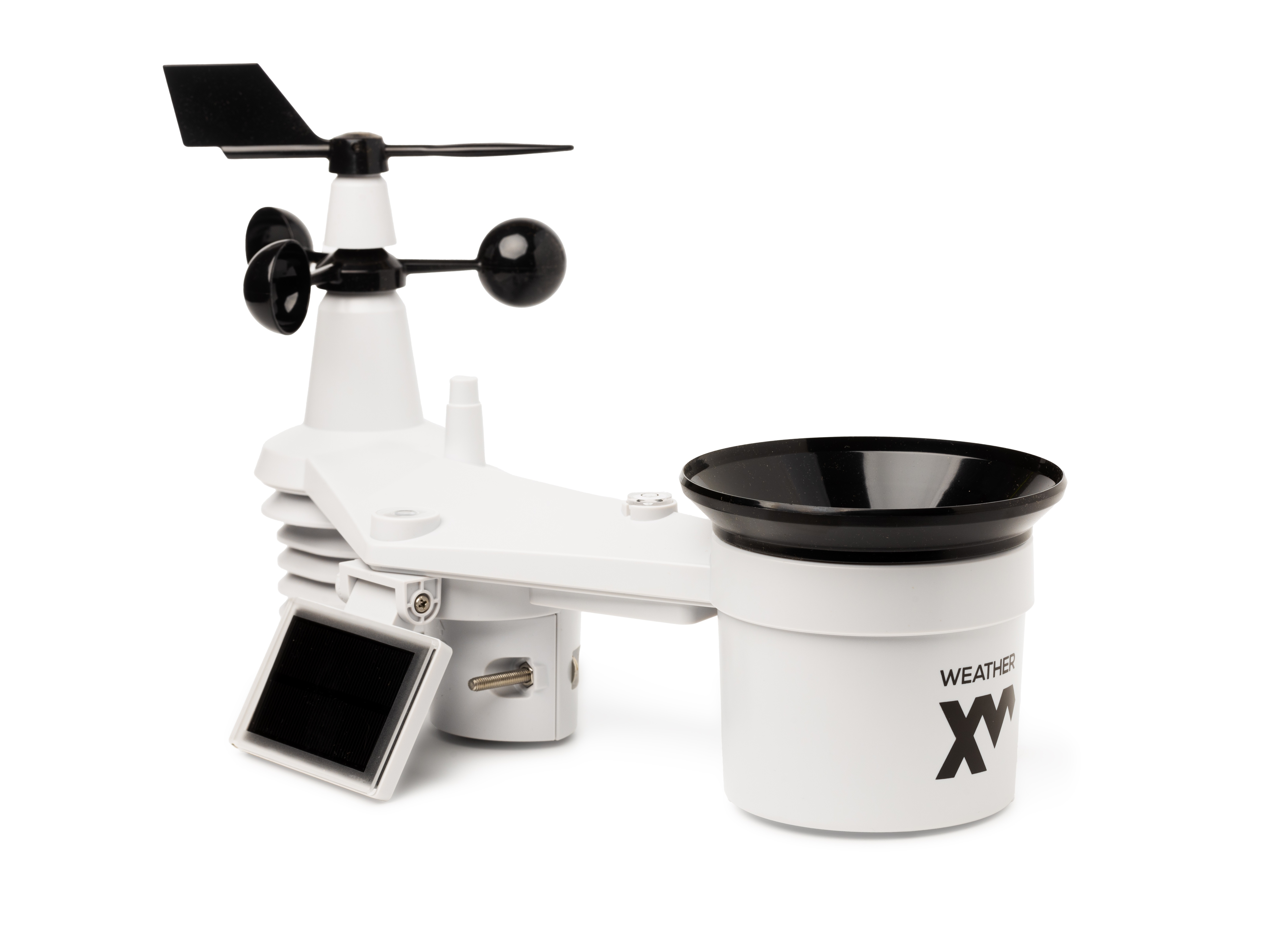
The WeatherXM H2 sensor array shares its industrial-grade hardware platform with the SenseCAP S2120 8-in-1 Weather Sensor, featuring optimized low-power firmware.
The H2 Open Edition operates completely independently of the WeatherXM reward network. It transmits standard LoRaWAN uplinks using customer-controlled OTAA credentials directly to your network server of choice (The Things Network, ChirpStack, or any private LoRaWAN gateway).
Overview & Next Steps
Getting started with your H2 Open Edition involves assembling the sensor, registering its OTAA credentials in your LoRaWAN Network Server (LNS), verifying frequency and uplinks, and mounting the station for accurate meteorological observations.
Step 1: Check Box Contents & Credentials
Locate the device label on the underside of your weather sensor or on the packaging box. It contains the factory credentials required for OTAA (Over-The-Air Activation):
- DevEUI: 16-character hexadecimal unique identifier
- AppEUI / JoinEUI: 16-character hexadecimal join identifier
- AppKey: 32-character hexadecimal application key
What's in the box:
- WeatherXM H2 all-in-one sensor array (wind vane, wind cups, rain collector, solar collector, thermo-hygrometer sensor radiation shield)
- External battery pack & mounting accessories
- Mounting U-bolts and metal clamps
What you will need:
- Batteries: 3× AA batteries (or 6× AA with external pack). Non-rechargeable 1.5V Lithium batteries are recommended for sub-zero operating environments.
- Mounting Pole: A rigid pole of at least 2m (6.5 ft) height and 30–40mm (1.2–1.6 in) outer diameter.
- LoRaWAN Gateway Coverage: Coverage from a public network (such as The Things Network Community Edition) or your own private LoRaWAN gateway connected to ChirpStack or TTN.
Step 2: Register Device in your LoRaWAN Network Server
Add the station to your application in The Things Stack Console, ChirpStack, or your private LoRaWAN Network Server.
Manual OTAA Registration Parameters
| Parameter | Recommended Value |
|---|---|
| Activation Mode | Over-The-Air Activation (OTAA) |
| LoRaWAN Version | Specification 1.0.2 |
| Regional Parameters | RP001 Regional Parameters 1.0.2 Rev B |
| Device Class | Class A |
Regional Frequency Plans
Ensure you select the frequency plan matching your hardware model and region:
- Europe (EU868):
Europe 863-870 MHz (SF9 for RX2 - recommended) - North America (US915):
United States 902-928 MHz, FSB 2 (used by TTN) - Australia (AU915):
Australia 915-928 MHz, FSB 2
Enter your DevEUI, JoinEUI / AppEUI, and AppKey from the device label and click Register end device.
Step 3: Power On & Bluetooth Configuration
- Install Batteries: Unscrew the battery compartment door at the bottom of the H2 weather station. Insert 3× AA batteries according to the marked
+/-polarity, then seal the door securely. - Inspect LED: Once power is applied, the red LED indicator on the bottom will flash.
- Bluetooth Configuration (if required): Open the WeatherXM BLE Web Flasher in a Web-Bluetooth-supported browser (such as Chrome) to inspect device status, verify firmware, or adjust regional frequency plans.
- Trigger Network Join: Press the configuration button on the bottom of the sensor once. The device will transmit an OTAA Join Request to your LoRaWAN network.
Step 4: Siting & Physical Installation
Proper mechanical alignment ensures high observation accuracy and prevents measurement artifacts:
- True North Alignment: Locate the N arrow embossed on the top of the weather sensor casing. Rotate the entire assembly so the arrow points precisely towards True North using a compass or phone GPS. This calibrates wind direction accuracy.
- Bubble Level: Check the integrated spirit bubble level on top of the sensor body. Ensure the bubble is perfectly centered before tightening the mounting clamps to prevent rain gauge measurement tilt error.
- Rain Funnel: Align the rain gauge funnel over the measuring mechanism and rotate clockwise until it firmly clicks into the locked position.
- Solar Panel Tilt: Loosen the solar bracket screw and angle the solar collector toward the equator (facing South in the Northern Hemisphere, North in the Southern Hemisphere) at an angle roughly equal to your local latitude.
- Pole Elevation: Mount the sensor on a pole at least 2m (6.5 ft) above ground or roof level, away from chimneys, heat sources, and wind obstructions.
Step 5: Verify Telemetry Uplinks
In your LoRaWAN Network Server console (e.g. The Things Stack Console > Live data tab), confirm that the join request was accepted and uplinks are arriving:
14:02:10 - Accept join-request
14:02:11 - Successfully joined the network
14:02:15 - Forward uplink data: FPort 1, Payload: 01 01 10 00 E4 02 01 ...
Once you observe the first Forward uplink data, the station is actively communicating with the network.
Step 6: Payload Formatter (Decoder)
To decode the raw hex payload into standard meteorological units, paste the following JavaScript decoder into your network server's Payload formatters > Uplink section:
function decodeUplink(input) {
  var bytes = input.bytes;
  var data = {};

  // Standard S2120 / H2 sensor packet decoder
  if (bytes.length >= 15) {
    // Air Temperature (0.1 °C, signed)
    var rawTemp = (bytes[3] << 8) | bytes[4];
    if (rawTemp > 0x7FFF) rawTemp -= 0x10000;
    data.temperature = +(rawTemp / 10).toFixed(1);

    // Relative Humidity (%)
    data.humidity = bytes[5];

    // Barometric Pressure (0.1 hPa)
    if (bytes.length > 8) {
      var rawPress = (bytes[7] << 8) | bytes[8];
      data.pressure = +(rawPress / 10).toFixed(1);
    }

    // Wind Speed (0.1 m/s) & Direction (deg)
    if (bytes.length > 12) {
      data.wind_speed = +(((bytes[9] << 8) | bytes[10]) / 10).toFixed(1);
      data.wind_direction = (bytes[11] << 8) | bytes[12];
    }

    // Rain accumulation & Solar radiation
    if (bytes.length > 18) {
      data.rain_accumulation = +(((bytes[13] << 8) | bytes[14]) / 10).toFixed(1);
      data.solar_radiation = (bytes[15] << 8) | bytes[16];
      data.uv_index = bytes[17] / 10;
    }

    // Battery voltage / status
    if (bytes.length > 20) {
      data.battery_voltage = +(((bytes[19] << 8) | bytes[20]) / 1000).toFixed(2);
    }
  }

  return {
    data: data,
    warnings: [],
    errors: []
  };
}
Features and Specifications
H2 Open Edition Weather Station (WS2001)
- Metric
- Imperial
Powered via an integrated solar panel with AA battery backup. Typical communication range is 2 to 10 km depending on gateway height, line-of-sight, and regional terrain.
-
Air Temperature:
- Range: -40.0 to 80.0 °C
- Accuracy: ±0.5 °C (0 to 80 °C), ±0.6 °C (-40 to 0 °C)
- Resolution: 0.1 °C
-
Air Humidity:
- Range: 1 to 99% RH
- Accuracy: ±3% (1 to 90% RH), ±4% (90 to 99% RH)
- Resolution: 1% RH
-
Rain Hourly Rate:
- Range: 0 to 450 mm/h
- Accuracy: ±7%
- Resolution: 0.254 mm/h
-
Barometric Pressure:
- Range: 540 to 1100 hPa
- Accuracy: ±5 hPa (700 to 1100 hPa), ±8 hPa (540 to 699 hPa)
- Resolution: 1 hPa
-
Wind Speed:
- Range: 0 to 50.0 m/s
- Accuracy: ±0.5 m/s (<5 m/s), ±10% (>5 m/s)
- Resolution: 0.1 m/s
-
Wind Direction:
- Range: 0 to 360°
- Accuracy: ±8°
- Resolution: 1°
-
Light Intensity:
- Range: 0 to 200,000 lux
- Accuracy: ±5%
- Resolution: 1 lux
-
UV Index:
- Range: 0 to 16.0
- Accuracy: ±10%
- Resolution: 0.1
General Parameters
-
Radio Architecture:
- Semtech LR1110 LoRaWAN sub-GHz transceiver
- LoRaWAN 1.0.2 Class A
- OTAA join with custom DevEUI / AppEUI / AppKey
- Regional frequency bands: EU868, US915, AU915, AS923
-
Operating Temperature:
- -20 to +60 °C (Alkaline batteries)
- -40 to +60 °C (Lithium batteries)
-
Operating Humidity:
- 0 to 99% RH
-
Device Weight:
- 1.5 kg (3.3 lb)
-
Certifications:
- CE / FCC / RoHS / IPX6 weatherproof housing
-
Solar Panel:
- 0.5W high-efficiency integrated collector
-
Battery Type:
- 3× AA 1.5V batteries (internal) / 6× AA with external pack (non-rechargeable Lithium recommended)
-
Battery Life:
-
1 year autonomous operation with solar panel assist (at standard 10–20 min uplink intervals)
-
Powered via an integrated solar panel with AA battery backup. Typical communication range is 1.2 to 6.2 miles depending on gateway height, line-of-sight, and regional terrain.
-
Air Temperature:
- Range: -40.0 to 176.0 °F
- Accuracy: ±0.5 °F (32 to 176 °F), ±0.6 °F (-40 to 32 °F)
- Resolution: 0.1 °F
-
Air Humidity:
- Range: 1 to 99% RH
- Accuracy: ±3% (1 to 90% RH), ±4% (90 to 99% RH)
- Resolution: 1% RH
-
Rain Hourly Rate:
- Range: 0 to 17.7 in/h
- Accuracy: ±7%
- Resolution: 0.01 in/h
-
Barometric Pressure:
- Range: 540 to 1100 hPa
- Accuracy: ±5 hPa (700 to 1100 hPa), ±8 hPa (540 to 699 hPa)
- Resolution: 1 hPa
-
Wind Speed:
- Range: 0 to 111.8 mph
- Accuracy: ±0.5 mph (<11.1 mph), ±10% (>11.1 mph)
- Resolution: 0.1 mph
-
Wind Direction:
- Range: 0 to 360°
- Accuracy: ±8°
- Resolution: 1°
-
Light Intensity:
- Range: 0 to 200,000 lux
- Accuracy: ±5%
- Resolution: 1 lux
-
UV Index:
- Range: 0 to 16.0
- Accuracy: ±10%
- Resolution: 0.1
General Parameters
-
Radio Architecture:
- Semtech LR1110 LoRaWAN sub-GHz transceiver
- LoRaWAN 1.0.2 Class A
- OTAA join with custom DevEUI / AppEUI / AppKey
- Regional frequency bands: EU868, US915, AU915, AS923
-
Operating Temperature:
- -4 to +140 °F (Alkaline batteries)
- -40 to +140 °F (Lithium batteries)
-
Operating Humidity:
- 0 to 99% RH
-
Device Weight:
- 3.3 lb (1.5 kg)
-
Certifications:
- CE / FCC / RoHS / IPX6 weatherproof housing
-
Solar Panel:
- 0.5W high-efficiency integrated collector
-
Battery Type:
- 3× AA 1.5V batteries (internal) / 6× AA with external pack (non-rechargeable Lithium recommended)
-
Battery Life:
-
1 year autonomous operation with solar panel assist (at standard 10–20 min uplink intervals)
-