Introduction of D1 bundle (WB1200)
You're now the proud owner of a WeatherXM Station. Welcome to the People's Weather Network!

Next steps
You just got your station, or, you will soon! Let's see what are the necessary steps in order to properly assemble, install, claim and enable it to send data in order to receive $WXM reward tokens.
Check the box contents
Make sure that everything is in order and you're all set to proceed with station assembly.
View ContentsAssemble your weather station
Assemble all parts and make sure all sensors work as expected. For this step, you will need 2 AA batteries that are not included in the box.
View Station Assembly InstructionsInstall your weather station
This is one of the most important steps, as proper installation is key in order to collect valid weather data. For this step, you will need a pole that is at least 2m/6.5ft and a way to secure it in place (both not included in the box). Here you will also see the best practices on how to properly install the station according to WMO.
View Station Installation InstructionsConnect and claim station
Once you've finished with installation, you can connect your station to your WG1200 Gateway and claim them as your own in WeatherXM network. To do this, you will need to download our WeatherXM app (Android and iOS).
View Connect and Claim InstructionsAdd your ERC20 compatible wallet
In order to receive WXM rewards, you will need to connect an ERC20 compatible wallet which supports Arbitrum One Network. We have prepared a guide to do so using MetaMask (although it is not mandatory to use this).
View Wallet Addition InstructionsFeatures and Specifications
WG1200 Gateway
- 3.95" capacitive touch screen with live weather tiles, trend charts, and daily min/max extremes
- Integrated barometric pressure sensor and ATECC608 hardware encryption
- Wi-Fi, BLE & LoRa connectivity (forwards weather data via 2.4 GHz Wi-Fi)
- microSD card slot for local weather history logging (CSV) with safe eject and an in-browser chart viewer
- Built-in Local Web Console (
http://<gateway-ip>/) featuring live & 24-hour interactive weather charts, hourly wind direction ribbons, and two-way display unit sync with the gateway screen - Local API, Home Assistant & Mesh Support: Local REST API with automatic Home Assistant discovery,
/llms.txtsupport for AI agents, and optional Meshtastic / MeshCore off-grid LoRa weather beacons - Powered by USB-C (power adapter not included) and over-the-air (OTA) or browser (flasher.weatherxm.com) firmware upgradable
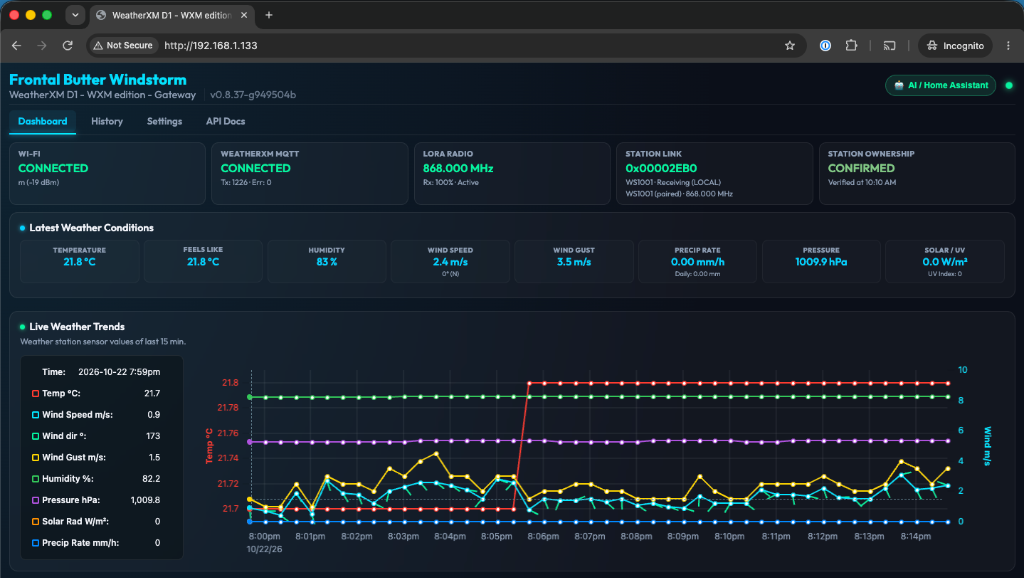
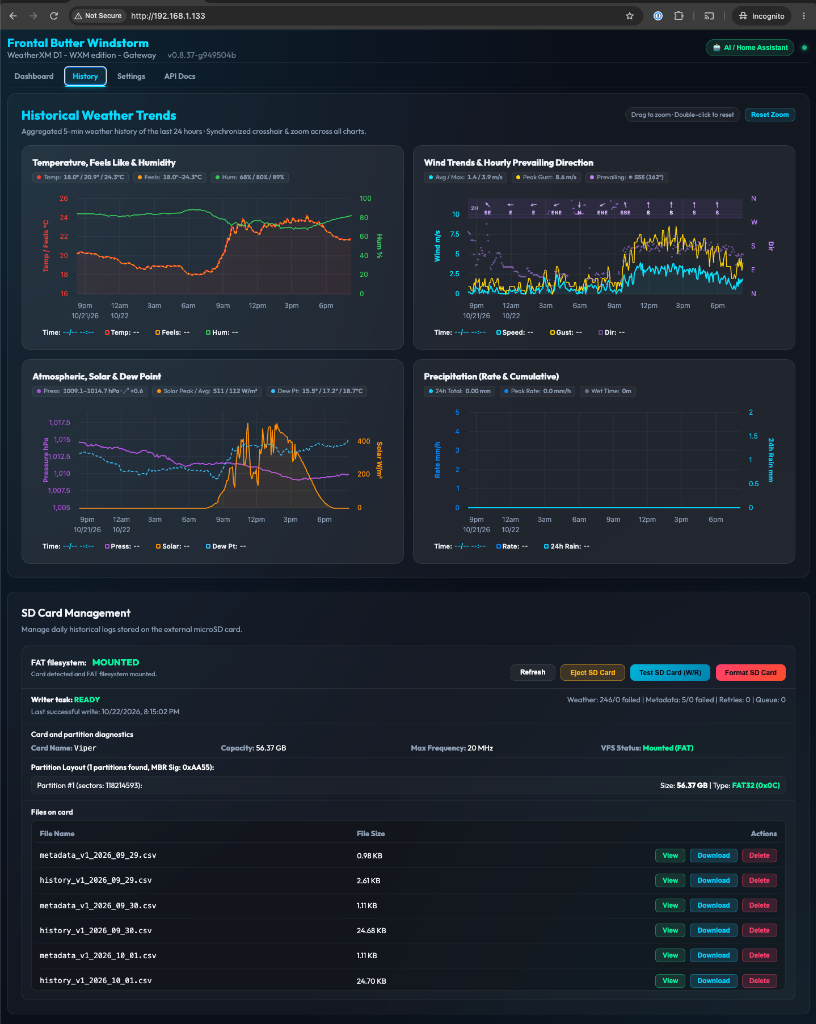
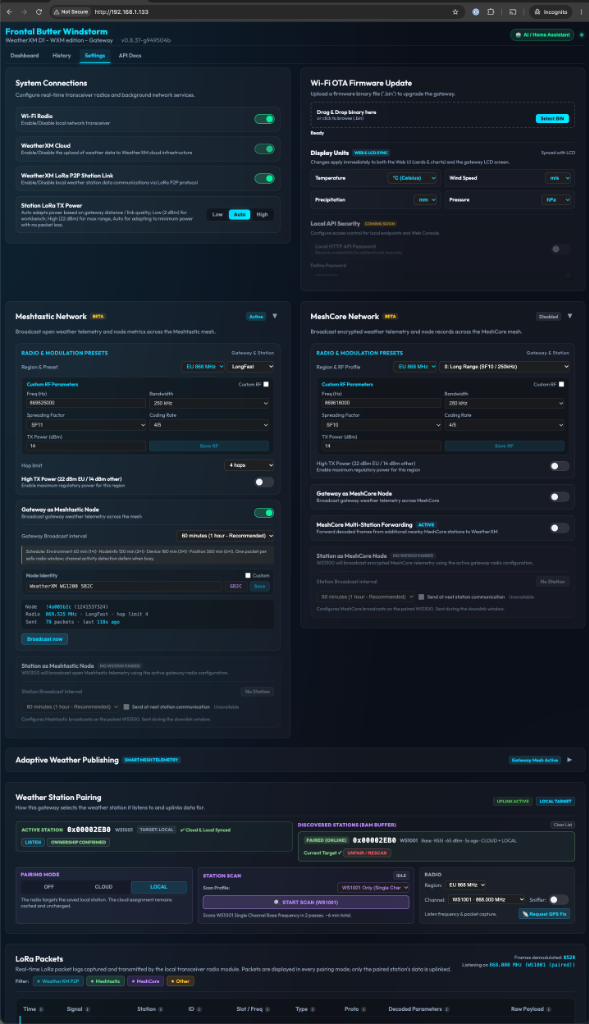
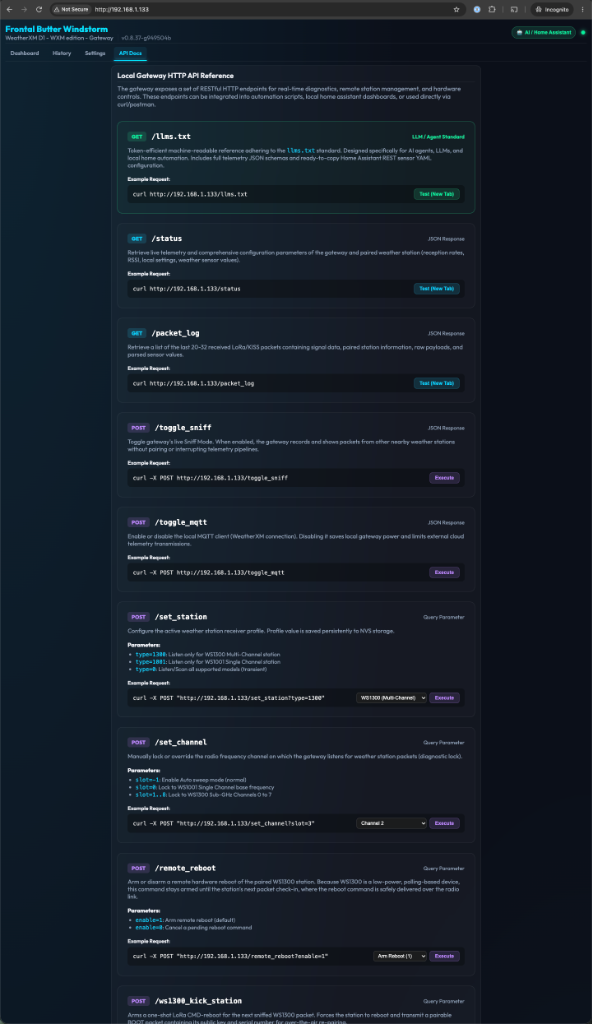
The WG1200 Gateway runs open-source firmware (Apache-2.0). For full feature details, local REST API documentation, Home Assistant & Meshtastic guides, custom firmware builds, and the release changelog, visit github.com/WeatherXM/wg1200-firmware.
WS1001 Weather Station
- Metric
- Imperial
Powered via a small solar panel and batteries and communicates with the WG1200 Gateway via RF (Radio Frequencies). The maximum distance between this station and the WG1200 is 100m with line of sight.
-
Temperature:
- Range: -40 ~ +60°C
- Accuracy: 0.2°C
- Resolution: 0.1°C
-
Relative Humidity:
- Range: 10% ~ 99%
- Accuracy: ±5%
-
Rain Volume:
- Range: 0 ~ 300 mm/h
- Accuracy: ±10%
- Resolution: 0.3mm
-
Wind Speed:
- Range: 0 ~ 50m/s
- Accuracy: ±1m/s (wind speed < 5m/s), ±10% (wind speed > 5m/s)
-
Wind Direction:
- Range: 0 ~ 359 degrees
-
Illuminance:
- Range: 0 ~ 200 klux
- Accuracy: ±25%
-
Pressure:
- Range: 300 ~ 1100 hPa (equivalent to +9000m ~ -500m above / below sea level)
- Accuracy: ±3.9Pa
- Resolution: 0.06Pa
-
Sensor:
- GPS sensor Integrated
- Reporting Interval: 20sec
Powered via a small solar panel and batteries and communicates with the WG1200 Gateway via RF (Radio Frequencies). The maximum distance between this station and the WG1200 Gateway is 328ft with line of sight.
-
Temperature:
- Range: -40 ~ +140 °F
- Accuracy: 0.2 °F
- Resolution: 0.1 °F
-
Relative Humidity:
- Range: 10% ~ 99%
- Accuracy: ±5%
-
Rain Volume:
- Range: 0 ~ 11.8 in/h
- Accuracy: ±10%
- Resolution: 0.01 in
-
Wind Speed:
- Range: 0 ~ 164 ft/s (111.8 mph)
- Accuracy: ±3.2 ft/s (wind speed < 16.4 ft/s), ±10% (wind speed > 16.4 ft/s)
-
Wind Direction:
- Range: 0 ~ 359 degrees
-
Illuminance:
- Range: 0 ~ 200 klux
- Accuracy: ±25%
-
Pressure:
- Range: 300 ~ 1100 hPa (equivalent to +9000m ~ -500m above / below sea level)
- Accuracy: ±3.9Pa
- Resolution: 0.06Pa
-
Sensor:
- GPS sensor Integrated
- Reporting Interval: 20sec